AI is changing how quickly software vulnerabilities are found and acted on. In September 2026, the Google Threat Intelligence Group reported that AI is accelerating vulnerability discovery across software, while Patchstack’s latest WordPress security report shows how short the response window can become once a serious flaw is public.
For businesses running WordPress, that raises an important question: is your website architecture exposing more of WordPress than visitors actually need? Headless WordPress is one way to reduce that exposure while also improving page delivery, although it is not automatically the right choice for every site.
What headless WordPress actually means
In a traditional WordPress setup, WordPress stores content and also generates the pages visitors see through a theme and plugins. A well-built traditional site can still be fast, especially with good caching, hosting, and a limited plugin set.
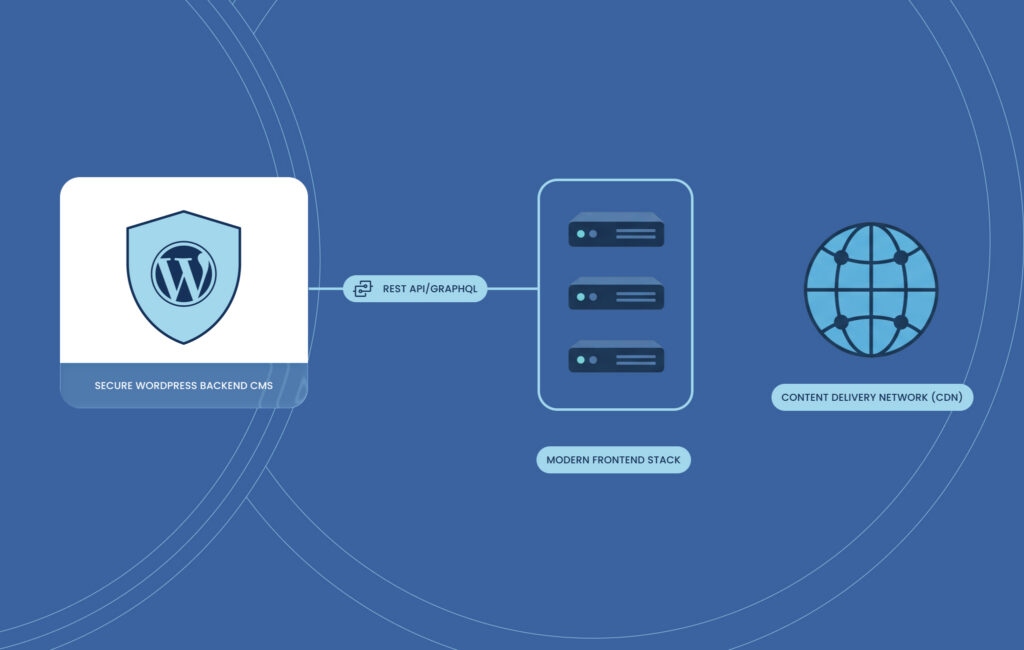
A headless, or decoupled, setup separates those jobs. WordPress remains the content management system, or CMS, where editors work, while a separate front end built with technology such as Next.js or Astro displays the website. The two communicate through an application programming interface, or API, such as the WordPress REST API.
A useful analogy is a restaurant: WordPress is the kitchen, while the front end is the dining room. Editors keep the familiar WordPress dashboard, but previews, forms, and publishing workflows need to be connected to the separate front end. The benefit is that visitors no longer need to interact with the full WordPress application just to read a page.
Why security is the strongest case
The security case starts with where WordPress vulnerabilities are found. Patchstack’s 2026 report, based on 2025 data, recorded 11,334 new vulnerabilities across the WordPress ecosystem, 42% more than in 2024. Of those, 91% were found in plugins and 9% in themes, while only six low-priority issues were reported in WordPress core.
Wordfence’s Q4 2025 Threat Intelligence Report, published in February 2026, reported that 2,213 vulnerabilities were added to its database during that quarter, with 905 still unpatched by the end of that period. Although these figures describe disclosed vulnerabilities, not hacked websites, they show why plugin choice and patching remain practical security concerns, particularly since the patching window can also be short. For example, Patchstack reported that 46% of the vulnerabilities it tracked in 2025 had not been fixed before public disclosure. In fact, for the most actively targeted flaws, exploitation was often measured in hours rather than days.
AI adds another factor, with the Google Threat Intelligence Group reporting in September 2026 that vulnerability disclosures across software rose from 5,045 in January to 10,740 in August, while the average number of vulnerabilities observed being exploited increased from 10.5 per month in 2025 to 18 per month between January and August 2026. Although the data is not WordPress-specific, it shows how quickly the area of vulnerability research is changing.
While headless WordPress does not remove these risks, it can reduce how much WordPress code is exposed to public visitors. The public front end can serve pages without WordPress rendering each request, while the CMS can sit behind tighter access controls such as network restrictions, VPN access, or company sign-in. Some presentation functions can also move out of WordPress, reducing dependence on front-end plugins.
A statically generated front end can also add resilience because, if published pages are stored separately from the CMS, they can remain available while WordPress is being patched or temporarily offline. Publishing, previews, and other dynamic functions may still depend on the CMS, however, so the degree of resilience will vary according to how the front end and supporting services are configured.
This still leaves important security work to do, including keeping WordPress updated, protecting administrator accounts with strong authentication, and applying appropriate API permissions. Headless is therefore best understood as defense in depth: it can reduce the public attack surface, but it does not replace routine security management.
Speed is the second case
Headless builds can also improve speed when pages are generated in advance. Instead of asking WordPress, PHP, and the database to assemble the same marketing page for every visitor, a site can pre-render the page and deliver it through a content delivery network, or CDN.
A CDN stores copies of website files across distributed servers, allowing users to receive content from a nearby network location rather than sending every request back to the main server. The result can be lower latency and less load on the WordPress server, which is useful when campaigns, media coverage, or product launches create sudden traffic spikes without requiring the same level of server scaling. Cloudflare provides a useful explanation of how CDN delivery works.
Google’s Core Web Vitals provide useful benchmarks. A good Largest Contentful Paint, or LCP, is 2.5 seconds or less, Interaction to Next Paint, or INP, is under 200 milliseconds, and Cumulative Layout Shift, or CLS, is under 0.1. These metrics cover loading, responsiveness, and visual stability. Google uses them in its ranking systems, but also makes it clear that good scores do not guarantee higher rankings.
Speed matters beyond SEO because faster, more stable pages reduce waiting and visual disruption at the points where visitors are trying to read, compare, or complete an inquiry. Performance should therefore be assessed alongside conversion data rather than treated as a technical score in isolation.
In WP Engine’s CentralSquare case study, a headless rebuild increased the mobile PageSpeed Insights score from 29 to 94 and was accompanied by a 56% increase in product demo requests. The project also changed the platform, design, and user journeys, so the conversion increase cannot be attributed to headless architecture alone.
For a Japan-facing website, the useful test is the performance of the pages customers actually use. Japanese and English landing pages, inquiry forms, and campaign pages should be measured before and after launch, with business outcomes considered alongside speed scores.
Where headless adds complexity
Headless creates another application to build and maintain. WordPress and the public front end need to be connected, deployed, and monitored separately, and some plugins that expect a conventional WordPress theme may need to be replaced or integrated differently. Preview workflows also need to be configured so editors can see changes before publishing.
For a small brochure site with modest traffic, few plugins, and no recurring security or performance problem, that extra complexity may not be justified. A well-maintained traditional WordPress site with strong access controls, fewer plugins, good caching, and a CDN may solve the real problem at lower cost. WordPress’s own performance guidance recommends several of these measures.
There is also some middle ground, since some businesses can keep WordPress for editing while publishing static copies of suitable pages or improve the current setup through better hosting, plugin governance, and security controls. These options can reduce risk and improve speed without a full headless rebuild.
The choice should therefore start with the current site: which plugins are essential, what is actually slow, what needs to remain dynamic, and who will maintain the system after launch. The architecture should follow those requirements, not the other way around.
Is headless WordPress right for you?
Headless is worth investigating when several of these conditions apply:
- The website directly generates leads or sales.
- Plugin maintenance is difficult, or the site has had recurring security problems.
- Important pages remain slow after sensible optimization work.
- Campaigns or media coverage create large traffic spikes.
- Japanese and English content needs to be reused across websites, apps, or other channels.
- A rebuild is already planned.
It is also important to decide who will own WordPress, the front end, deployment, and security after launch, because an unclear division of responsibility can create operational problems even when the architecture itself is sound.
A smaller attack surface, with the right trade-offs
Headless WordPress can reduce the amount of WordPress code exposed to visitors, make pre-rendered pages faster to deliver, and keep published pages available during some CMS maintenance or outages. Those benefits can be valuable for business-critical sites, but they come with additional development and maintenance work.
A hardened traditional WordPress build will still be the better choice for some companies, while others will have enough security, performance, and content-delivery requirements to justify going headless. The right decision depends on the problems the current site is actually creating rather than on the architecture alone.
Netwise can assess the current site, identify where the real risks and bottlenecks are, and help determine whether a conventional rebuild, static approach, or full headless architecture fits the business. Contact Netwise to discuss a WordPress security and performance review.