
Every business owner and marketing leader knows their website is a vital asset, but how does one measure its actual effectiveness, or evaluate its health? How can you identify problems lurking below the surface, the ones a simple visual inspection won’t reveal?
Many website owners and operators have no idea.
Our latest article introduces a simple, non-technical framework built on 6 essential pillars—from Performance and SEO to Conversions and Usability—to help you cut through the confusion and see what shape your website’s really in, with tips for how to make it work better for your business.
Table of Content
- Is My Website Actually Working?
- Why Website Quality Matters More Than Ever
- A Simple Framework for Evaluating Website Health
- How to Measure Website Health (Free, Practical Checks)
- Benchmarks for “Good Enough” Website Health
- Common Problems That Hurt Website Performance
- What to Fix First: A Practical Prioritization Guide
- Website Health Checklist
- Website Health Is Ongoing, Not a One-Time Project
- Clarity Beats Perfection
Is My Website Actually Working?
Many small and mid-sized businesses (SMEs) in Japan and around the world find themselves asking this very question.
The website exists and looks fine, but leads come in more slowly than they should. Updates are risky because nobody is sure what will break, and internal teams do not share a clear definition of what “good” looks like. The simple fact is that it can be hard to tell whether website performance is helping or hindering its role as a tool for your business, and to answer that question you need to take a look under the hood. The good news is this: a useful health check does not require a lot of technical knowledge, and it does not require fixing everything at once.
This article offers a simple framework to evaluate website health, decide what to check first (with the use of free tools), and know how to prioritize fixes that reduce risk and improve outcomes. Let’s dive in.
Why Website Quality Matters More Than Ever
A website is not a brochure. It is a working business asset that shapes trust before a sales call and supports credibility during the consideration and comparison phases of a potential engagement.
For many SMEs, the site also influences hiring decisions, partnerships, and investor conversations, and it affects day-to-day operations. If the site is slow, visitors feel friction before they understand the offering. If navigation is unclear, people lose confidence even when the product is strong. If SEO basics are weak, the business becomes invisible to customers who are actively searching.
The cost of a “mostly okay” website shows up as small losses across the entire funnel. Slow load times reduce patience, unclear structure reduces understanding, and weak content reduces relevance, which means the business has to work harder to earn each inquiry. Website quality is not about design taste. It is about performance, clarity, and usability, three qualities that greatly influence both revenue and LTV.
A Simple Framework for Evaluating Website Health
Website audits can feel intimidating because they mix technical terms with subjective feedback.
A simpler approach is to judge a site through 6 pillars. These pillars cover how the site performs, how it communicates, and how well it supports business goals.
- Performance: Is the site fast and stable on real devices?
- Usability (UX): Can users find what they need without effort?
- Content: Is the message clear, current, and useful?
- SEO: Can search engines understand and rank the site?
- Conversions: Does the site guide users to take action?
- Accessibility: Can everyone use it comfortably?
These areas are interconnected and work together as a whole to help your website succeed (or fail).
A weak performance score can undermine great content, confusing UX can waste good SEO, and poor conversions can make strong traffic look like a failure. Perfection is not the goal. The goal is a healthy balance, where no single weakness quietly blocks results.
How to Measure Website Health (Free, Practical Checks)
Business leaders do not need to master every tool to obtain value from them. A few free checks can reveal the biggest risks and help teams agree on what is real, what is perception, and what needs action.
Performance: Speed & Stability
A quick first stop for performance is Google PageSpeed Insights.
Start with the mobile results, because mobile performance is often the limiting factor for business sites. Then check whether the key pages pass Core Web Vitals, Google’s experience signals for load speed, responsiveness, and layout stability.
In plain language, the Core Web Vitals metrics ask three questions:
- How quickly does the main content become usable?
- How quickly does the page react to a tap or click?
- Does the layout stay stable while it loads?
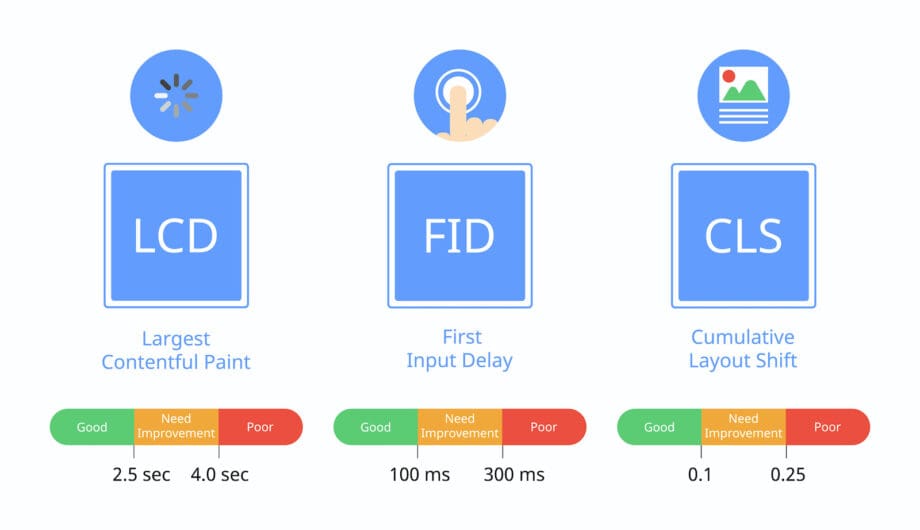
When performance is poor, users feel it immediately. The first load creates doubt, buttons react late, and content shifts on screen in ways that cause misclicks and frustration.
A practical benchmark is to aim for the green range that PageSpeed Insights labels as “good,” then prioritize the pages that matter most, such as the homepage, key service pages, and conversion pages.
SEO: Visibility & Technical Health
Two simple questions guide this check: Is Google finding the site, and is it indexing the pages that matter? Google Search Console is the best starting point because it shows indexing status, search visibility, and technical warnings.
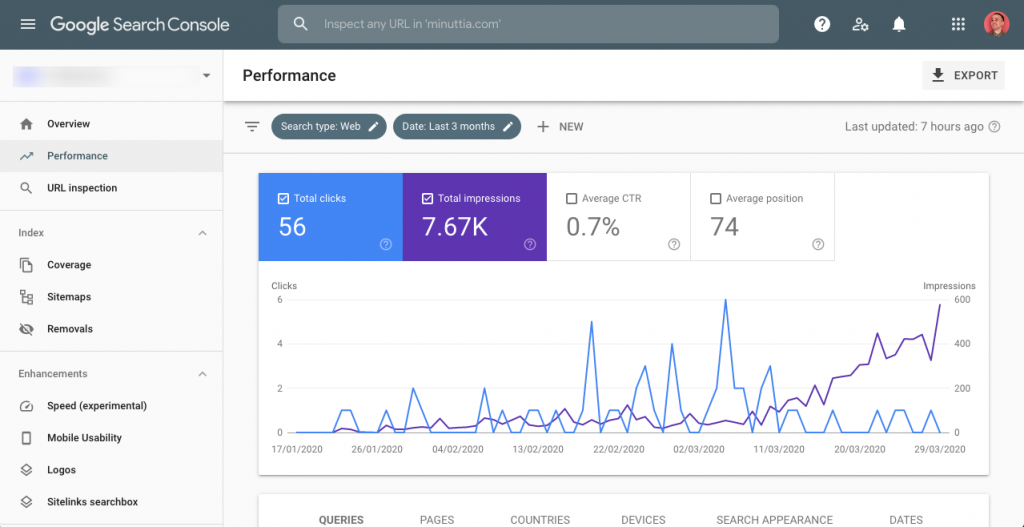
Start by confirming that the pages that matter are indexed, including the homepage, top service pages, and any key landing pages. Then look for errors, warnings, or sudden drops that suggest technical issues. Finally, do a quick reality check by searching for branded queries and core service terms to see whether the right pages appear at all.
A basic manual check helps too. Searching for the brand name and a few service keywords can reveal whether the site appears at all, and whether the page titles and descriptions communicate clearly. If Search Console is not installed, that in itself is a signal that the business is operating without a reliable view of search health.
Usability & Behavior
Usability problems often hide in plain sight. A leadership team may feel the site is clear, but real users might get lost, hesitate, or leave without taking action. Behavioral tools make that visible.
Start with Google Analytics 4 (GA4) to understand what people do at scale. Then use a behavior tool like Hotjar or Microsoft Clarity to see why those patterns happen.
Three signals matter most. If the bounce rate is high on key pages, especially pages receiving paid or organic traffic, the experience is not matching expectations. If users arrive but do not scroll, the page is likely unclear above the fold. If navigation paths loop or show repeated back-and-forth behavior, visitors are getting lost.

Session recordings and heatmaps (above) are especially helpful for non-technical teams because they turn abstract metrics into understandable behavior. If users repeatedly click in the same spot, hesitate, or abandon forms, the problem is usually not “marketing.” It is a friction point the site can fix.
Accessibility & Readability
Accessibility is often treated as a compliance topic, but it is also a practical quality signal. If a site is hard to read, hard to navigate, or unclear in structure, it creates friction for everyone. A simple starting tool is WAVE, which highlights issues such as missing labels, contrast problems, and heading structure. WAVE commonly flags low-contrast text that is hard to read on mobile, missing form labels that make forms confusing or unusable, and heading structures that look fine visually but are logically broken. Accessibility improvements often improve conversion rates and usability because they force clarity.
When content is structured well and interactive elements are labeled properly, every user benefits.
Benchmarks for “Good Enough” Website Health
“Good enough” does not mean perfect. It means the site is not actively hurting the business, and it provides a stable foundation for marketing, sales, and future improvements. The simplest way to define “good enough” is by outcomes and friction.
Performance
A “good enough” site feels fast on mobile. Pages load quickly enough that users do not question reliability, the layout does not jump during load, and buttons and menus respond immediately when tapped.
If PageSpeed Insights shows key pages in the “good” range for Core Web Vitals, that is a practical indicator the site is meeting modern expectations.
UX
A “good enough” site helps users answer the following three questions within seconds:
- What does this company do?
- Is this for me?
- What should I do next?
If visitors cannot answer these questions quickly, the site will struggle regardless of design quality.
SEO
A “good enough” site is visible and understandable to search engines. Main pages are indexed, Search Console shows no critical errors, and page titles, headings, and content match real search intent.
When SEO basics are healthy, content improvements and new pages can compound results over time.
Conversions
A “good enough” site makes the next step obvious. Calls to action are clear and consistent, contact paths are easy to find from any key page, and users do not reach dead ends like pages with no next step.
Conversions do not come from aggressive selling. They are born of clarity.
Accessibility
A “good enough” site is readable and navigable for a wide range of users. Text is comfortable to read on mobile, navigation works with a keyboard, and forms are labeled and usable. These benchmarks are intentionally simple, because they help leaders decide whether the site is healthy enough to optimize, or whether it is accumulating risk.
Common Problems That Hurt Website Performance
Most underperforming websites fail in predictable ways. These issues are rarely the result of a single bad decision; they usually accumulate over time as sites grow, change, and adapt to new needs. The goal is to recognize these patterns quickly and focus on fixing what matters most.
Slow pages
Slow pages are often caused by heavy images uploaded without compression, outdated themes or plugins that add unnecessary code, and too many third-party scripts such as trackers and widgets.
Confusing navigation
Navigation issues usually come from trying to serve too many audiences at once. Common causes include menus with too many items, labels that make sense internally but not to customers, and important pages buried under “About” or “Services” without a clear hierarchy.

Weak or invisible CTAs
A site can look polished and still fail to guide action. This often happens when “Contact us” is buried or only appears in the footer, service pages explain offerings without suggesting a next step, or forms feel generic in a way that reduces trust.
Outdated or vague content
Content can quietly degrade even if the site design stays modern. Messaging may reflect past offerings or old positioning, copy may lean on internal language instead of customer needs, and pages may lack proof points, examples, or clear differentiation.
Technical debt
Technical debt is what builds up when issues are not addressed. It often shows up as broken links or missing pages, a poor mobile experience caused by older layouts, and Search Console warnings that have been ignored for months.
These problems compound, and a site that is slightly slow and slightly unclear will usually underperform more than teams expect because friction happens at every step.
What to Fix First: A Practical Prioritization Guide
The fastest way to reduce stress is to stop treating the website as one big problem. A better approach is to prioritize fixes by effort and impact, and to focus first on the pages that influence revenue, lead quality, and trust.
Quick Wins (Low Effort, High Impact)
Quick wins are improvements that reduce friction without changing the site’s structure. Think of them as clearing the clutter that slows users down and creates unnecessary doubt. This often includes compressing and resizing images on high-traffic pages, tightening headlines and page introductions so visitors understand the offering quickly, making calls to action clearer and more consistent, and fixing broken links that create dead ends. These changes often create quick gains because they remove avoidable confusion.
Medium-Level Improvements
Medium-level improvements require more coordination, but they usually do not require rebuilding the site. This is where teams align structure and messaging so the site matches how customers think, not how the organization is arranged internally. The focus is typically on simplifying navigation so the structure reflects how customers think, rewriting key pages for clarity, improving mobile usability through spacing and tap targets, and adding basic SEO structure with clear titles, headings, and internal linking.
This is often where SMEs see the strongest results, because it improves both experience and discoverability.
Major Fixes (When It’s Time for a Redesign)
Sometimes the site cannot be improved sufficiently through incremental work alone. In that case, a redesign becomes the most efficient option.
A redesign becomes the right decision when the site structure no longer matches the business, when performance issues cannot be patched without replacing foundational elements, when the content strategy is fundamentally broken and pages need to be rethought rather than rewritten, or when the CMS or architecture is holding the team back and making updates slow, risky, or expensive.
Not every site needs a full redesign, but when the foundation is limiting progress, the incremental fixes start to cost more than they deliver.
Website Health Checklist
This checklist is designed for a fast self-assessment.
☐ Mobile pages feel fast and stable
☐ The homepage communicates the value proposition clearly
☐ Navigation makes sense to first-time visitors
☐ Main pages are indexed in Google
☐ Key pages have clear calls to action
☐ Content reflects current offerings and priorities
☐ Basic accessibility checks pass (readable text, usable forms, logical headings)
If several items are uncertain, that is a useful result. It usually means the site needs clearer measurement, a sharper content structure, or an audit to identify where friction is hiding.
Website Health Is Ongoing, Not a One-Time Project
Websites degrade over time, even when teams do nothing wrong. The business changes, technology evolves, user expectations rise, and new devices and browsers shift what “fast” and “readable” mean.
A practical cadence helps prevent small issues from becoming expensive problems.
Monthly light checks can stay simple. Run PageSpeed Insights on a few key pages, review Search Console for indexing or performance changes, and scan analytics for unusual drops or spikes.
Quarterly deeper reviews should focus on the pages that drive outcomes. Recheck top landing pages against real search intent, use heatmaps or session recordings to find friction in key conversion paths, and audit forms, CTAs, and core navigation for clarity.
An annual strategic evaluation is where leadership should step back. Revisit structure, messaging, and positioning, confirm the CMS and architecture still support the team’s workflow, and decide whether incremental improvements are still the best path.
Optimization is also risk reduction, because it prevents the site from slowly becoming unreliable, unclear, or invisible.
Get Started Today
A simple self-check, some free tools, and a mindset focused on prioritization are often enough to identify what is hurting performance most. Don’t put this off unnecessarily.
If a quick self-check raises more questions than answers, a structured audit can help clarify what is holding the site back and what to tackle first. If an expert second opinion would help, we can help you dig deeper and to turn those signals into clear next steps. Contact us to set up an exploratory call.